Kafka
A Kafka step produces records to a topic or consumes records from one. The produce step measures the broker's acknowledgement (ack) time, the consume step the time spent waiting for a record. Two extra measurements show what the load does to the pipeline: end-to-end latency (kafka_e2e_latency, from produce to consume) and consumer lag (kafka_consumer_lag, how many records a consumer group is behind). You can watch the lag of your own steps' group or of your real service's group.
Creating the connection
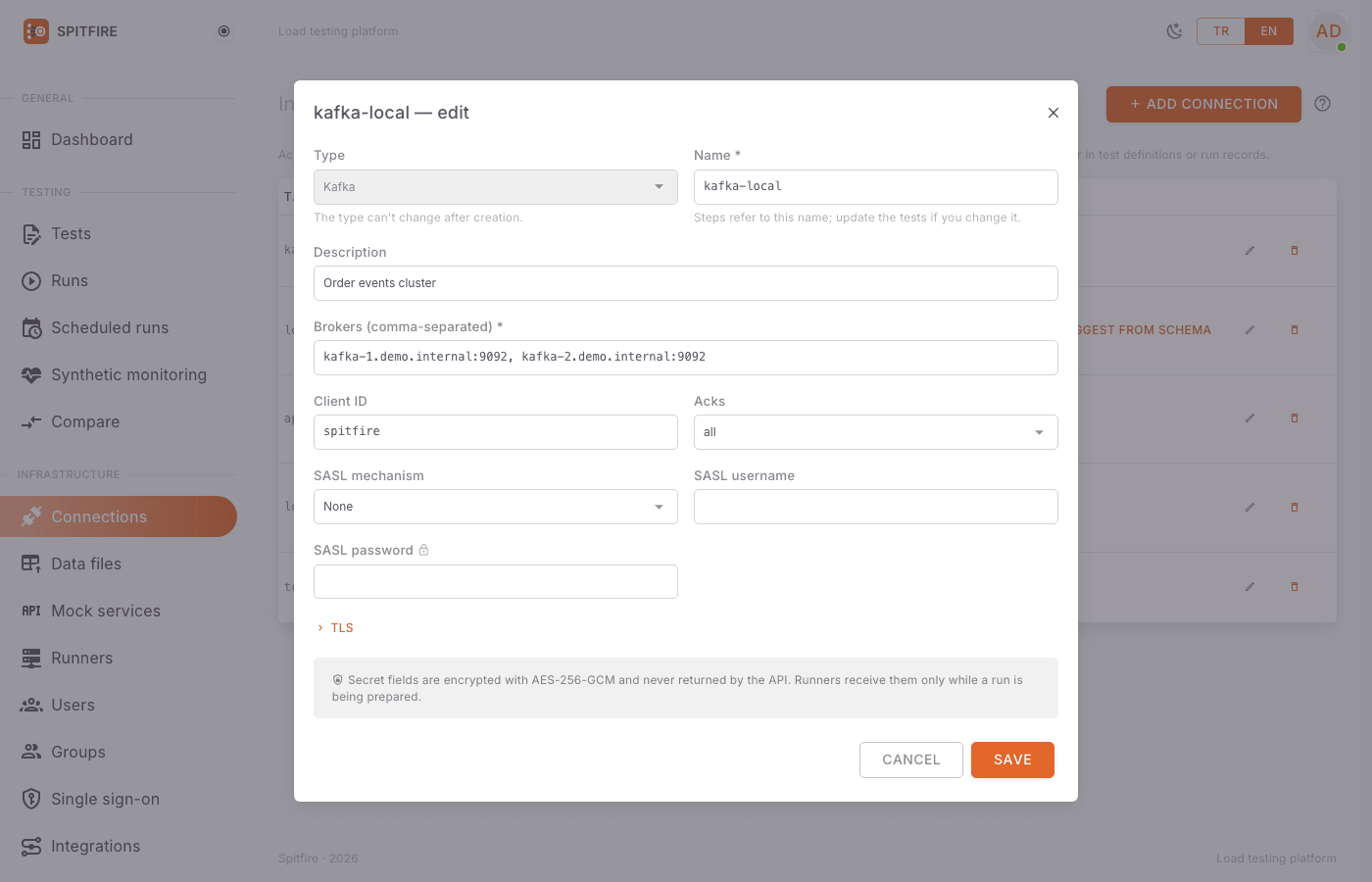 Kafka connection
Add a connection of type Kafka (Adding a connection), e.g. kafka-local. Fields of this type:
- Brokers (comma-separated): required, e.g.
kafka-1:9092, kafka-2:9092. - Client ID (optional, e.g.
spitfire): appears in broker logs and quotas. - Acks:
all(default, all replicas),leaderornone. The produce time is measured with this setting; choose what production uses. - SASL mechanism (
PLAIN,SCRAM-SHA-256,SCRAM-SHA-512), SASL username, SASL password (a secret). SASL usually goes with TLS: TLS settings.
Produce step
- Add step → Protocol: Kafka, Connection:
kafka-local, Action: Produce. - Write the Topic, the Key (the same key goes to the same partition) and the Value; add Headers if needed.
- Stamp records (spitfire-ts) for end-to-end latency is on by default. Turn it off if the target system rejects unknown headers (
"noStamp": true). A header of your own with the same name is left alone. - For your real service's lag, write group names, comma-separated, in Lag of other consumer groups (e.g.
order-service; at most 10).
 Kafka produce and consume steps
Consume step
- Action: Consume, and write the Topic.
- With Consumer group empty, each VU reads the topic on its own from the latest record. When set (e.g.
spitfire-load), the VUs share the partitions like a real consumer group. - If no record arrives within Wait (default 10s), the step fails with
no record on <topic> within 10s. - Watch this consumer group's lag appears once you set a fixed group and is ticked by default (
"noLag": trueturns it off).
[
  {"id": "send", "name": "Send order", "protocol": "kafka", "connection": "kafka-local",
   "kafka": {"action": "produce", "topic": "orders", "key": "{{__VU}}",
     "value": "{\"id\": \"{{$uuid}}\"}", "lagGroups": ["order-service"]}},
  {"id": "read", "name": "Read order", "protocol": "kafka", "connection": "kafka-local",
   "kafka": {"action": "consume", "topic": "orders", "groupId": "spitfire-load", "wait": "10s"}}
]How end-to-end latency is measured
The produce step adds a spitfire-ts header to every record (<unix ns>;<source>). When a consume step reads a record stamped in the same run on the same runner, it writes the time from sending to reading as kafka_e2e_latency. Records produced by other tools, runs or runners are consumed normally but not measured.
Why the same runner: runners' clocks can differ by more than the latency being measured. Spitfire never compares two machines' clocks; when the runner that produced a record reads it, both ends read the same monotonic clock. In a run over N runners about 1/N of the records are measured, and the run page says so: N runners: records produced on another runner are not measured, so this is a sample of the traffic.
How consumer lag is measured
- Lag = the partition's end offset − the group's committed offset. On a partition with no commit, every record counts.
- One runner per run (the one with the first share of the load) queries the Kafka admin API every 2 seconds. The query is read-only: it never joins the group, commits or resets offsets.
kafka_consumer_lagis the total per group;kafka_consumer_lag_partitionis per partition (labelledgroup/partition; at most 64 series per group).- Topic and group must be fixed names, not templates (
{{…}}); with a template the lag is not watched and the editor warns.
The connection's user needs Describe on the topic (metadata, ListOffsets) and Describe on every watched group (OffsetFetch). Without them the run goes on, a warning is written, and only the lag is not reported.
Metrics and thresholds
The common metrics are in Metrics of every step. For Kafka, req_duration is the broker ack time for produce and the time waiting for the record for consume. The Kafka card on the run page shows the End-to-end latency (produce → consume) and Consumer lag (records) charts, and each group's lag At the end and its Peak.
[
  {"metric": "kafka_e2e_latency", "expr": "p(95)<500"},
  {"metric": "kafka_consumer_lag", "expr": "max<10000"},
  {"metric": "kafka_consumer_lag", "filter": {"check": "order-service"}, "expr": "value<100"}
]max<10000: no watched group fell further behind than that. value<100: less than 100 records of lag left when the run ended. filter.check picks a single group. We usually put value<100 on the real service's group: what matters is not the peak during the run but whether the service catches up once the load ends.
Common problems
The general table of connection, SASL and TLS errors: Protocols and connections.
| Symptom | Cause | Fix |
|---|---|---|
Test is green or half works, then connection refused or a timeout |
The address the broker advertises (advertised.listeners) does not resolve from the controller or the runners. |
Make sure the advertised host names are reachable from the controller and the runners. |
The produce step fails with UNKNOWN_TOPIC_OR_PARTITION |
The topic does not exist; Spitfire does not create topics or ask the broker to. | Create the topic with your service's partition count (e.g. kafka-topics.sh --create --topic events --partitions 3). After a run Findings shows "Topic not found". |
TOPIC_AUTHORIZATION_FAILED or GROUP_AUTHORIZATION_FAILED |
The user has no right on the topic or the group. | Grant Write/Read/Describe in the Kafka ACLs. |
Consume keeps failing with no record on orders within 10s |
No new records arrive; a consume without a group starts at the latest record. | Add a produce step to the same test or run the system that writes to the topic; raise Wait. |
| End-to-end latency is empty or has very few samples | Produce and consume run on different runners, the stamp is off, or another system produces the records. | Keep the stamp on and put the produce and consume steps in the same scenario. |
| consumer lag is not watched: the topic or consumer group is a template | The topic or group contains {{…}}. |
Use fixed names on steps whose lag you watch. |
| The run goes on but there is no lag chart, and there is a permission warning | No Describe right on the topic or the group. | Grant Describe on the topic and every watched group. |