Is the new release slower? Find out before it goes live.
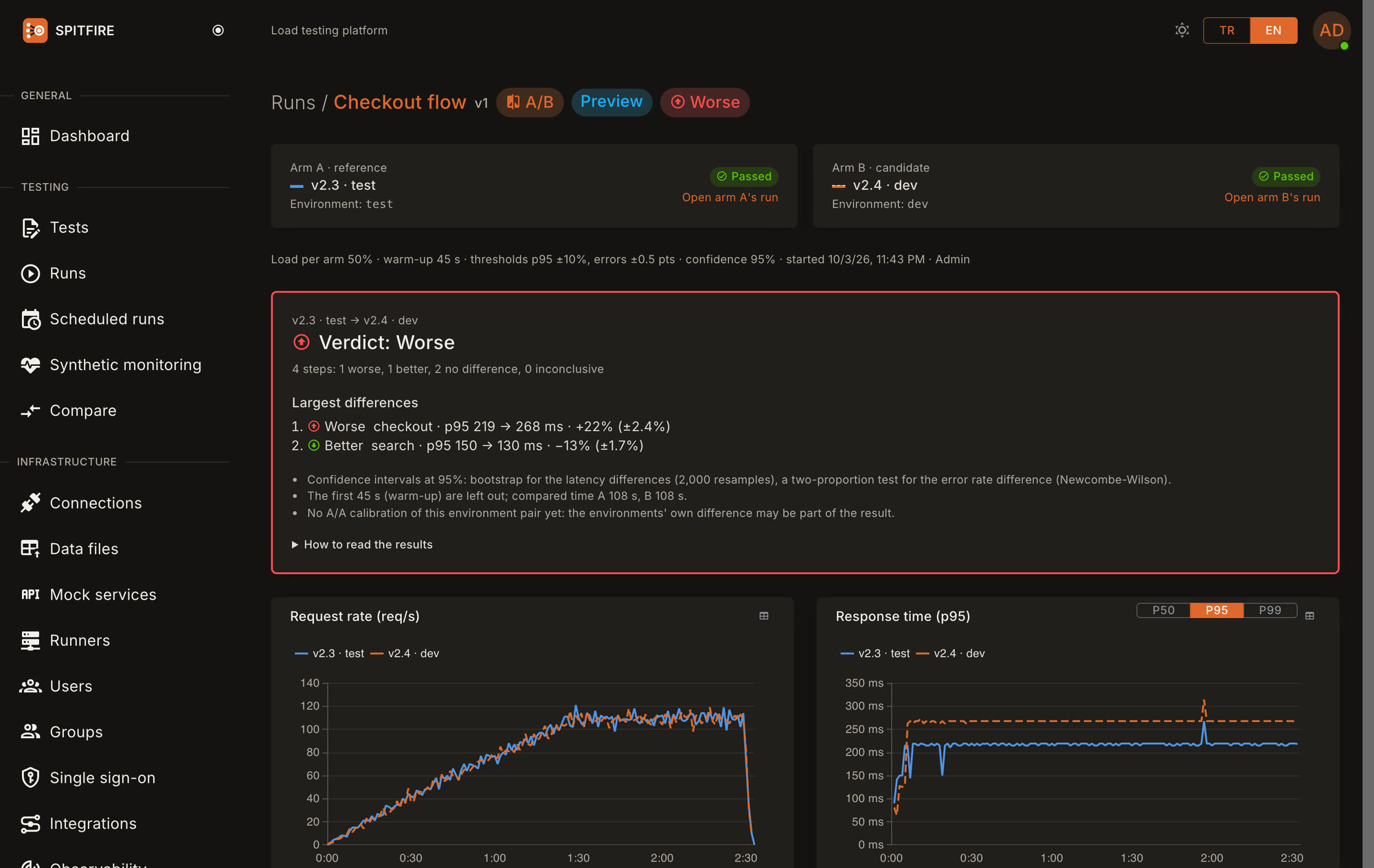
Run the same test, with the same load, at the same time, against the environment running the old release and the one running the new release. Every runner splits its load evenly between the two, so network and timing differences do not skew the result. At the end Spitfire shows the difference step by step and says it plainly: better, no difference, or worse.
When to use it
Before a release
The new release runs next to the old one under the same load before it goes live.
An infrastructure change
A new database version or a new server type: the old and the new infrastructure meet the same test.
A library or framework upgrade
See where performance goes when the framework, the ORM or the runtime version changes.
A configuration change
Connection pool size or a cache setting: measure the change instead of guessing.
How it works
- STEP 1
Pick the environments
From the test's Environments tab pick the one running the old release as A and the one running the new release as B, and write the version labels.
- STEP 2
Equivalence check
Spitfire compares the two environments and warns about differences; you go on by confirming or fixing them.
- STEP 3
One run, both at once
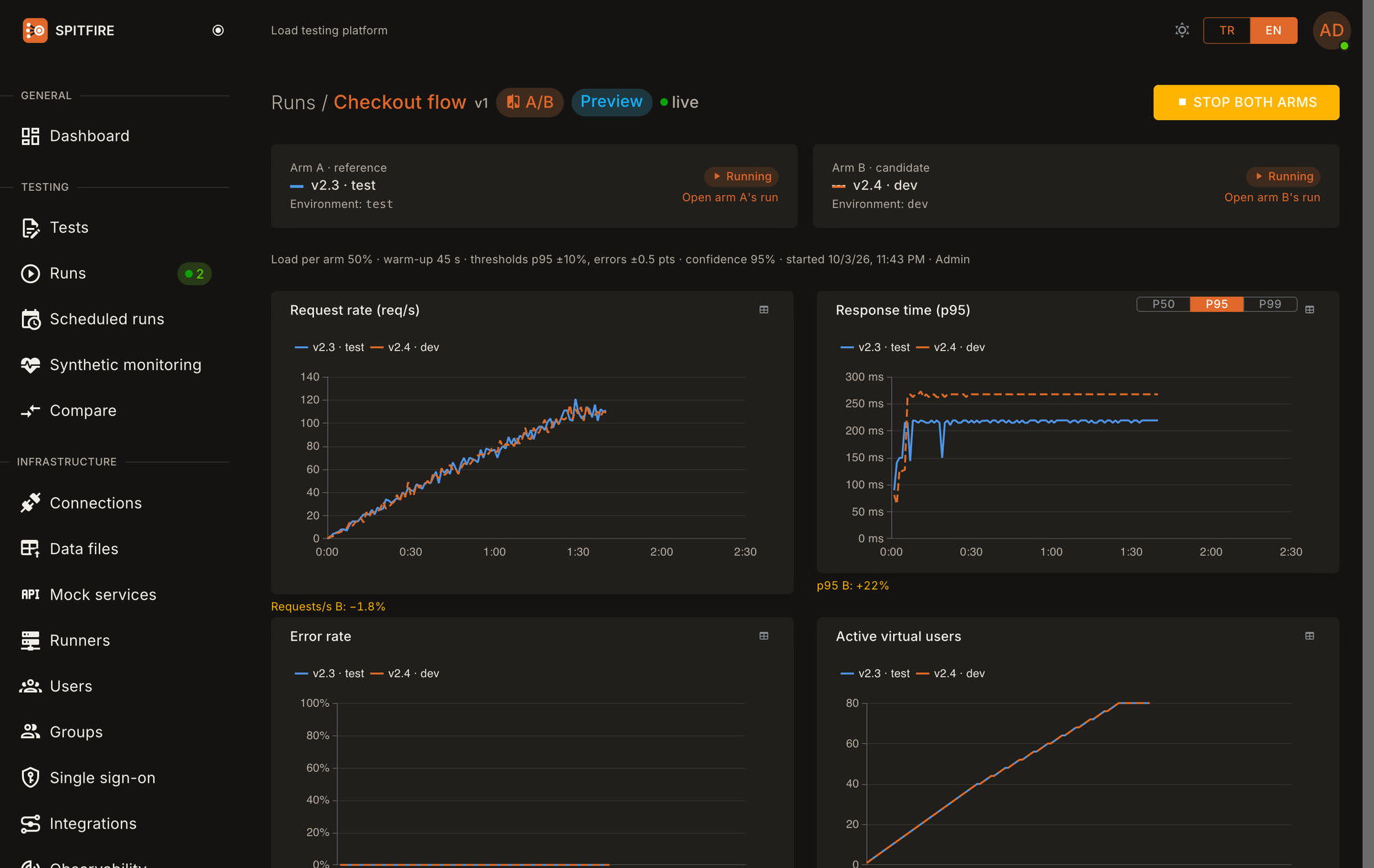
The same test runs against both environments at the same time with the same load; the live screen shows both arms side by side.
- STEP 4
Verdict
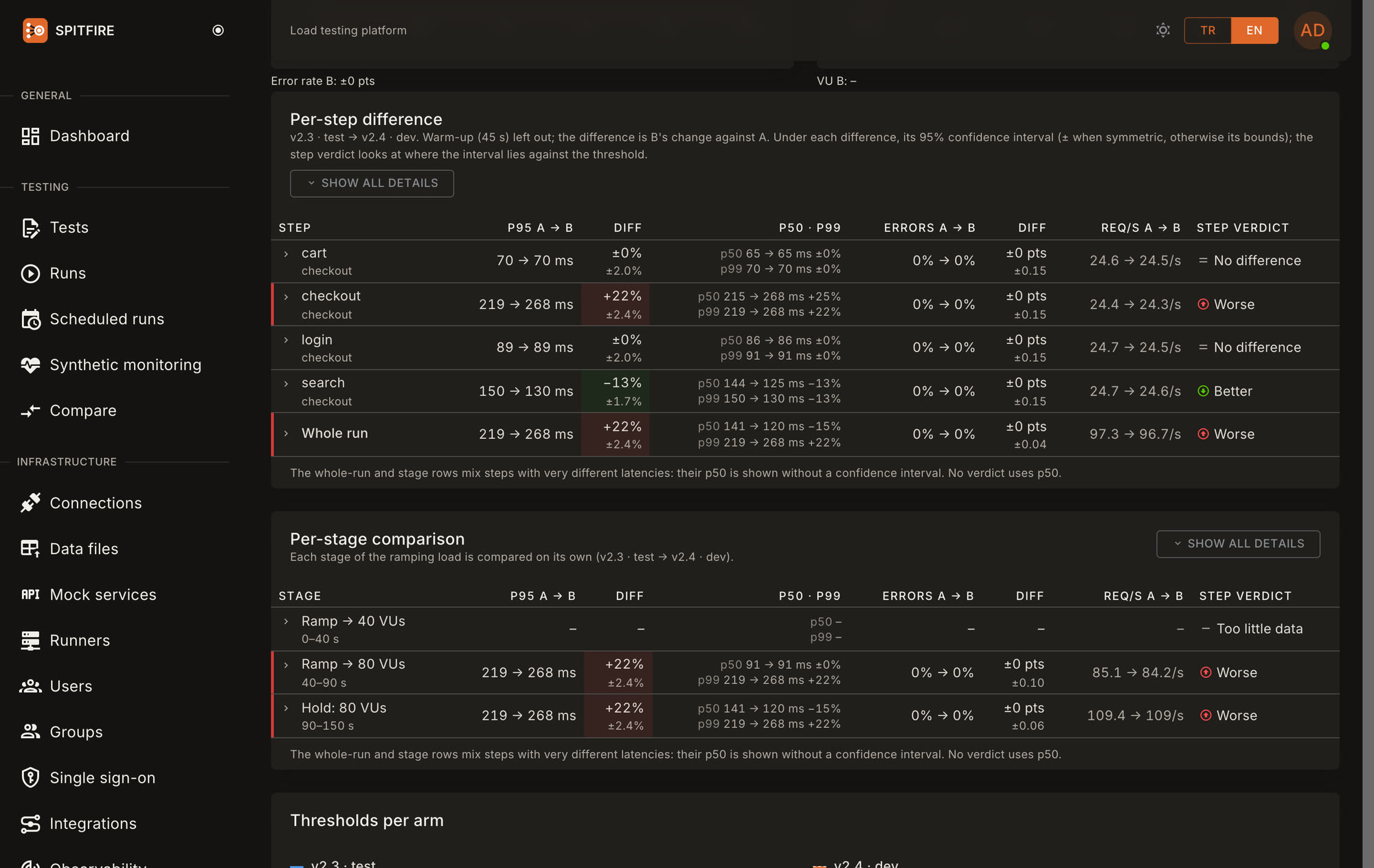
At the end, a step-by-step difference table, a confidence interval for every difference, and the verdict: better, no difference, worse, or inconclusive while the measurement is not clear yet.
Like for like
A comparison means something only when both sides are measured under the same conditions.
Evenly split load
Every runner splits its virtual users evenly between the two arms, so a slowdown on the runner (CPU, network, GC) hits both alike. Load steps change on both arms at the same moment, and the location split is the same.
Pre-check
Before it starts, a light health request goes to both environments: response time, network latency from the runners, TLS and HTTP version are compared, and a clear difference gets a warning.
Shared infrastructure warning
When both environments point at the same database or cache (same host:port), or you marked them so, it warns: the two arms compete for one resource and the difference can hide.
A/A calibration
A short calibration run while both environments run the same release measures how they differ on their own; later comparisons show that difference apart from the result.
Version endpoint
Give an environment a version address (say GET /version) and both arms' versions are read and recorded at the start; if both report the same version, it warns.
Only one environment?
In sequential mode the two releases take turns on the same environment: A, B, A, B (2 rounds by default, each the same length). You switch the release; between rounds Spitfire waits and tells you with a run.switch_needed webhook; you confirm in the UI, the CLI or with an API call, and it sees the switch itself when a version endpoint is set. Taking turns spreads time-bound effects like cache warm-up and daily traffic over both releases; the verdict card says 'sequential comparison' and the uncertainty band is wider.
A release gate in CI
Give spitfire cloud run --compare in the pipeline. If the new release is worse, the step exits with code 98 and the deployment stops.
GitHub Actions
- name: Spitfire version comparison
  run: spitfire cloud run "Checkout flow" --compare A=test,B=dev --label-a v2.3 --label-b $GITHUB_SHA
  env:
    SPITFIRE_URL: https://spitfire.example.com
    SPITFIRE_TOKEN: ${{ secrets.SPITFIRE_TOKEN }}
GitLab CI
version-comparison:
  script:
    - spitfire cloud run "Checkout flow" --compare A=test,B=dev --label-a v2.3 --label-b $CI_COMMIT_SHORT_SHA
# SPITFIRE_URL, SPITFIRE_TOKEN: Settings → CI/CD → Variables (token masked)| Exit code | Meaning |
|---|---|
0 | Better or no difference. "Inconclusive" exits 0 too; 98 with --fail-on-inconclusive. |
98 | The comparison says worse. |
97 | The comparison is invalid: an arm dropped, or with --strict the equivalence check failed. |
99 | A threshold failed (as today, k6-compatible). |
How to read the result
The comparison is per step: for each step both arms' p50, p95, p99, error rate and requests/s side by side, with the difference. The warm-up is left out of the comparison.
Every difference comes with a confidence interval. +26% (±4%) means the real difference is most likely between 22% and 30%.
If the whole interval is above the acceptable threshold the step is worse; if it is wholly past the threshold in the improving direction, better; if it is wholly inside, no difference. If the interval crosses the threshold the result is inconclusive: the measurement is not clear enough yet, and a longer run is suggested.
If any step is worse, the verdict is worse. Spitfire states the difference and its numbers; it never claims an internal cause it cannot see.
If no step is clear enough for a verdict, the verdict is inconclusive; inconclusive steps are counted on the verdict card. Latency differences get their interval by bootstrap (2,000 resamples), the error rate difference by a two-proportion test; you pick the confidence level (90%, 95%, 99%) when you start the run.
Which plans
| Plan | Version comparison | From CI and scheduled |
|---|---|---|
| Free | 1 a month | — |
| Growth yearly | ✓ | ✓ |
| Growth monthly | ✓ | — |
| Growth 1 month (one-time) | ✓ | — |
| Scale yearly | ✓ | ✓ |
| Scale monthly | ✓ | — |
| Scale 1 month (one-time) | ✓ | — |
| Enterprise yearly | ✓ | ✓ |
In a comparison run the virtual user, requests/s and runner limits apply to both arms together: each arm uses half.
Frequently asked
How do I know whether the new release is slower than the old one?
My two environments are not identical. Can I still trust the result?
Why not run twice and compare the two runs?
I have one test environment. Can I still use it?
Can CI stop the deployment when the new release is slower?
spitfire cloud run the --compare flag; if the new release is worse the step exits with 98 and the deployment stops.