CI/CD integration
You run a saved test from your pipeline (GitHub Actions, GitLab CI, Jenkins, Azure Pipelines). The test runs on the controller and your runners generate the load; the CI machine only runs the small spitfire CLI, waits for the run to finish and returns an exit code from the result. If a threshold or budget breaks, the step turns red and can block the merge. --pr-comment writes a per-step summary to the pull request, --compare puts two versions under the same load.
Nightly tests do not need a pipeline: Schedules and monitoring.
Before you start
- The test is saved in Spitfire and has run successfully at least once from the web UI.
- The user who creates the token may run the test. If the test page shows the view only badge, the token cannot run it either; an admin must mark the test "can run" in one of your groups.
- The CI machine can reach Spitfire's web address (8470 by default on Docker, or the HTTPS address in front of it).
Creating an API token
The CLI connects with a personal API token. The token works with its owner's current role and groups and can only do this: list and validate tests, start and stop runs and comparative runs, read results.
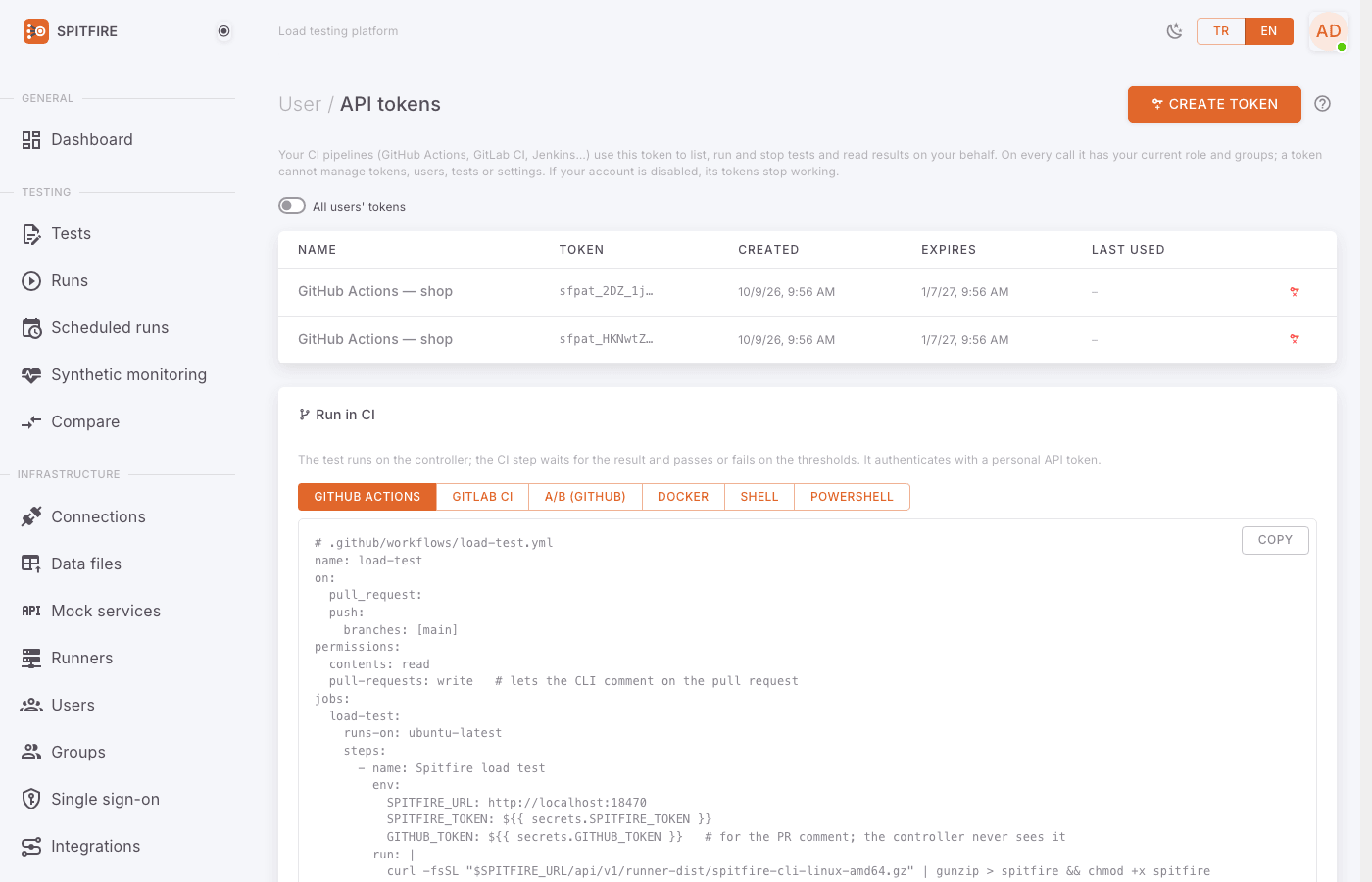 API tokens page
- Open API tokens from the profile menu at the top right.
- Press Create token.
- Give it a name that identifies the pipeline (e.g.
github-checkout-pr). The audit log shows which pipeline started a run by this name. - Pick how long it stays valid in Expires. An expired token gets 401.
- Create it and copy the token (
sfpat_…). It is shown only this once. - Save it as the CI secret variable
SPITFIRE_TOKEN: on GitHub under Settings → Secrets and variables → Actions, on GitLab under Settings → CI/CD → Variables (Masked).
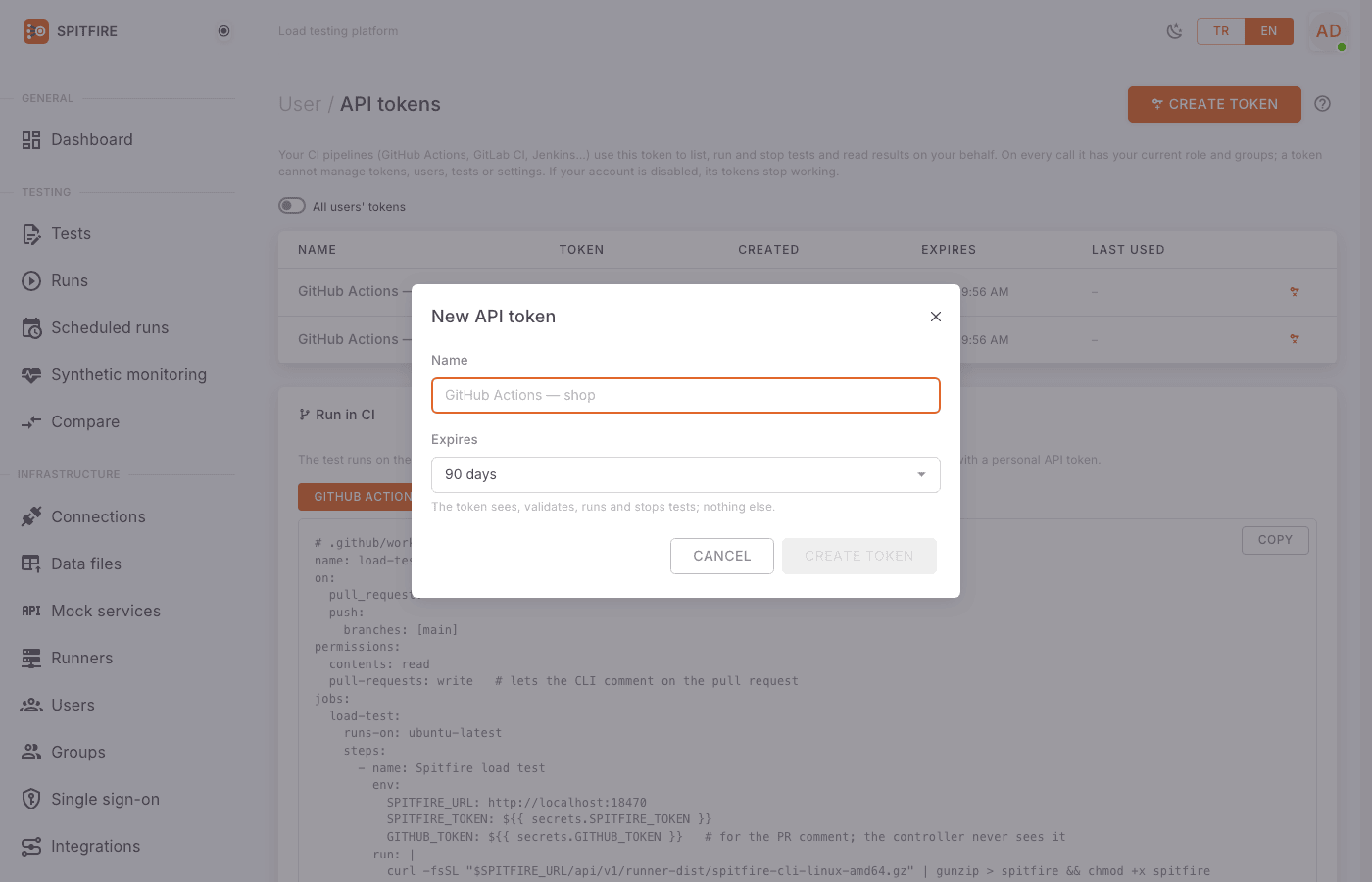 New API token dialog
Never write the token in YAML, a script or on the command line. A --token flag exists, but always use the SPITFIRE_TOKEN environment variable.
If a token leaks, press Revoke on the same page. Pipelines using it get 401 at once; this cannot be undone. Create a new token and update the CI variable.
Installing the CLI
The controller serves the CLI itself, so the CLI is always the controller's version. The commands compare the download's SHA-256 with the X-Content-SHA256 header the controller sends and stop on a partial or altered download.
Linux (amd64):
curl -fsSL -D cli.headers -o spitfire.gz "$SPITFIRE_URL/api/v1/runner-dist/spitfire-cli-linux-amd64.gz" &&
  echo "$(awk -F': ' 'tolower($1)=="x-content-sha256"{print $2}' cli.headers | tr -d '\r')  spitfire.gz" | sha256sum -c - &&
  gunzip -c spitfire.gz > spitfire && chmod +x spitfire
Windows (PowerShell):
$r = Invoke-WebRequest "$env:SPITFIRE_URL/api/v1/runner-dist/spitfire-cli-windows-amd64.exe" -OutFile spitfire.exe -PassThru -UseBasicParsing
if ((Get-FileHash spitfire.exe -Algorithm SHA256).Hash -ne "$($r.Headers['X-Content-SHA256'])") { throw 'spitfire.exe: SHA-256 mismatch' }
Docker image (the CLI is inside):
docker run --rm -e SPITFIRE_URL -e SPITFIRE_TOKEN usespitfire/spitfire spitfire cloud run "Checkout flow"
| Variable | Meaning |
|---|---|
SPITFIRE_URL |
Spitfire's address, e.g. https://spitfire.example.com (or --url) |
SPITFIRE_TOKEN |
Personal API token (sfpat_…) |
SPITFIRE_WORKSPACE |
Optional workspace name or id (or --workspace) |
Give SPITFIRE_URL with https://; over plain HTTP the token can be read on the way. A token is valid in the workspace it was created in; an install admin who sees every workspace picks one with --workspace. For a certificate signed by a corporate CA pass --ca corp-ca.pem; --insecure only for trials.
Check which tests the token sees:
./spitfire cloud tests             # every test
./spitfire cloud tests checkout    # names containing "checkout"
Tests you cannot run show (view only).
The CI button on the test page
You do not have to write the YAML by hand. The CI button at the top of the test page opens the Run in CI dialog with examples that already hold the address and the test name: GitHub Actions, GitLab CI, A/B (GitHub), Docker, Shell, PowerShell. Pick a tab and take it with Copy. The button shows only if you may run the test; the same examples are at the bottom of the API tokens page.
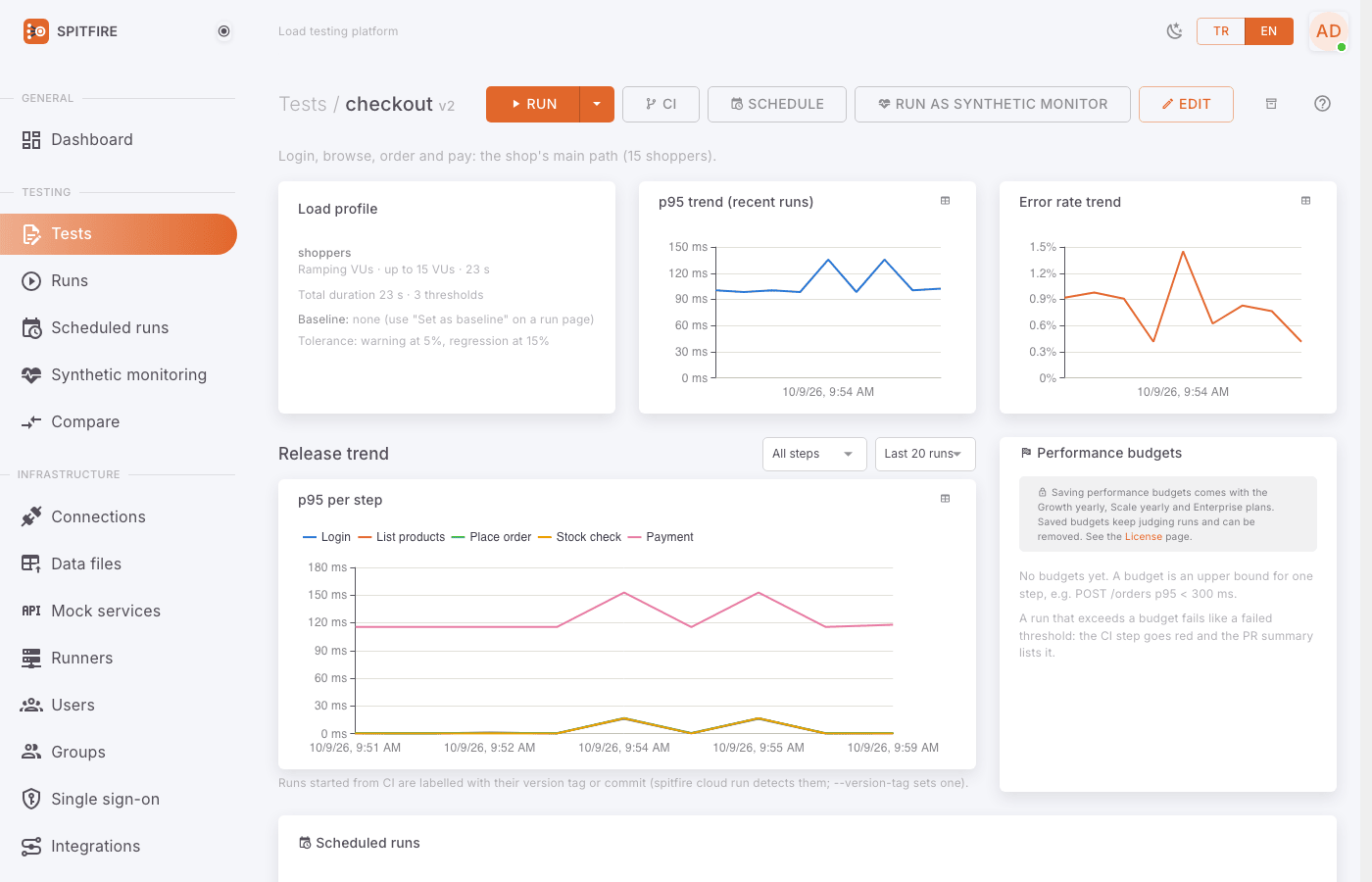 Test page header
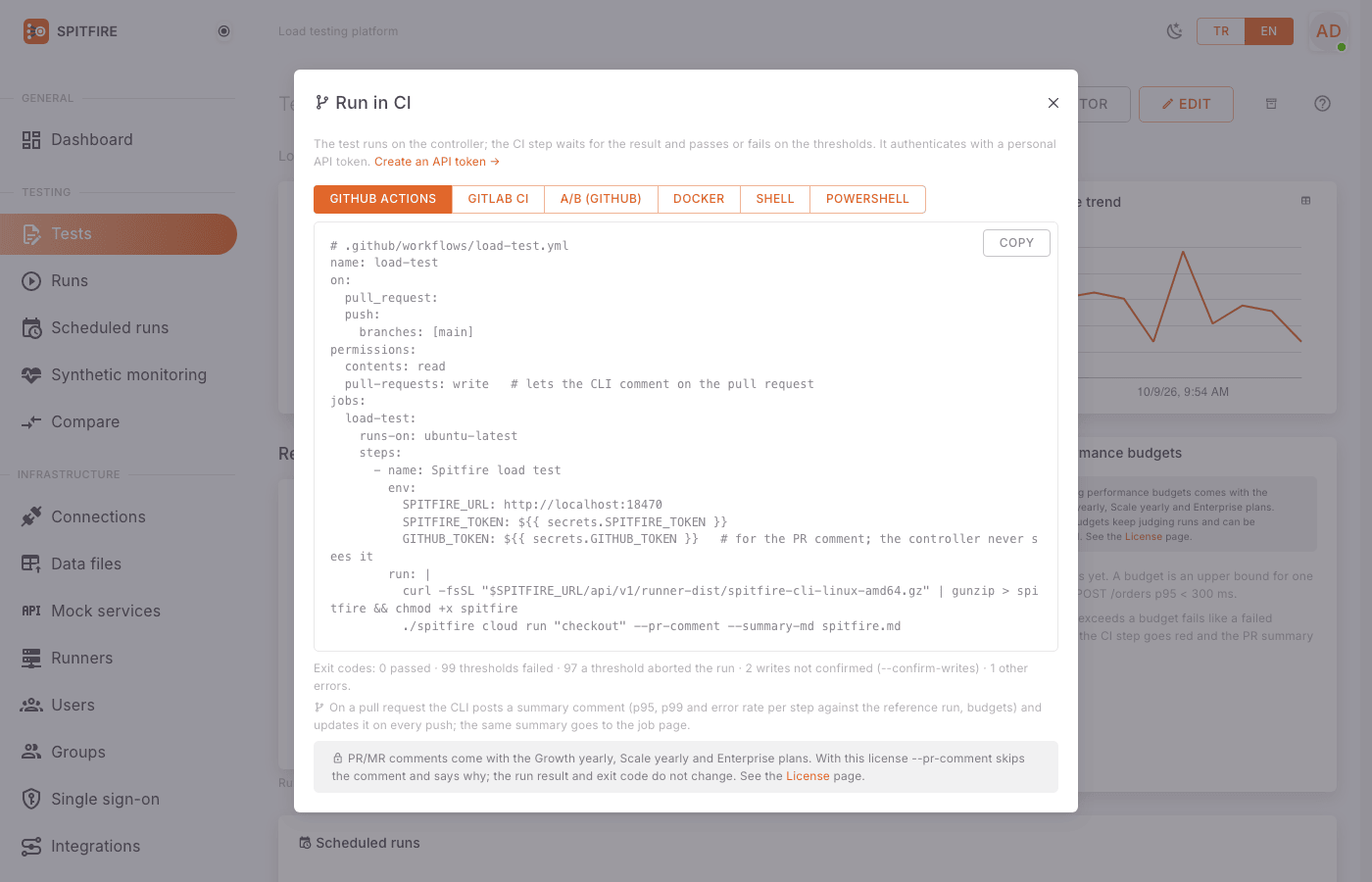 Run in CI dialog
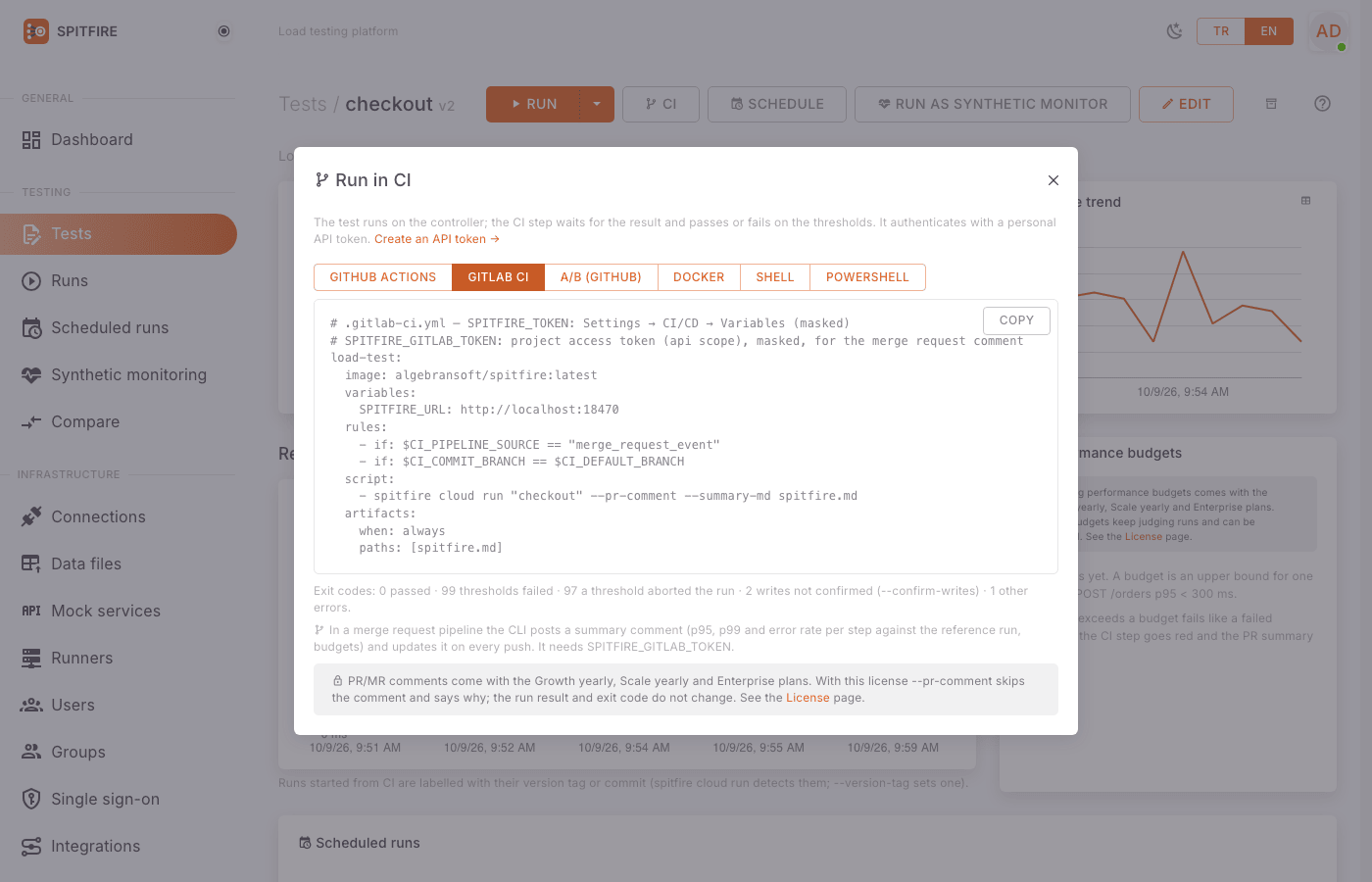 GitLab CI tab
Running a test from a pipeline
GitHub Actions
We recommend the Spitfire GitHub Action: it downloads the CLI from your controller and verifies its SHA-256, waits for the run, and adds the PR comment, the job summary and the exit-code and result outputs.
- uses: usespitfire/spitfire-action@v1
  with:
    url: https://spitfire.example.com
    token: ${{ secrets.SPITFIRE_TOKEN }}
    test: "Checkout flow"
    environment: staging
For the comment the job needs permissions: pull-requests: write. All inputs: spitfire-action (the Action is also on the GitHub Marketplace). If you would rather not use the Action, call the CLI directly; the full example is under PR comments.
At the end of a deploy job, deploy: true makes the Action announce the deploy to your synthetic monitors; without test it only announces (Close watch after a deploy).
GitLab CI
# .gitlab-ci.yml: SPITFIRE_TOKEN, Settings → CI/CD → Variables (masked)
load-test:
  image: usespitfire/spitfire
  variables:
    SPITFIRE_URL: https://spitfire.example.com
  script:
    - spitfire cloud run "Checkout flow"
The Spitfire GitLab template does the same with your controller's CLI (SHA-256 verified), comments on the merge request and keeps the summary as an artifact. Its .spitfire-deploy job announces the deploy to your synthetic monitors.
include:
  - remote: https://raw.githubusercontent.com/usespitfire/spitfire-examples/main/ci/gitlab/spitfire.gitlab-ci.yml
load-test:
  extends: .spitfire-load-test
  variables:
    SPITFIRE_URL: https://spitfire.example.com
    SPITFIRE_TEST: "Checkout flow"
SPITFIRE_ENVIRONMENT: stagingPlanned maintenance from a pipeline
Before a deploy that causes downtime, put the monitors into maintenance: checks are skipped, no alert goes out, and the downtime does not count against uptime or SLOs (Planned maintenance). The minutes (1-1440) end the maintenance on their own if the job dies halfway.
# GitHub Actions: before the deploy …
- uses: usespitfire/spitfire-action@v1
  with:
    url: https://spitfire.example.com
    token: ${{ secrets.SPITFIRE_TOKEN }}
    maintenance: 30            # minutes, 1–1440: a safety net if the job dies
    environment: prod
    maintenance-note: database migration
# … and after it: end the maintenance and announce the deploy in one step
- uses: usespitfire/spitfire-action@v1
  if: always()
  with:
    url: https://spitfire.example.com
    token: ${{ secrets.SPITFIRE_TOKEN }}
    maintenance: end
    deploy: true
environment: prod# GitLab CI: the template's .spitfire-maintenance job
maintenance-start:
extends: .spitfire-maintenance
stage: deploy
variables:
SPITFIRE_URL: https://spitfire.example.com
SPITFIRE_ENVIRONMENT: prod
SPITFIRE_MAINTENANCE: "30"
maintenance-end:
extends: .spitfire-maintenance
stage: .post
when: always
variables:
SPITFIRE_URL: https://spitfire.example.com
SPITFIRE_ENVIRONMENT: prod
SPITFIRE_MAINTENANCE: endJenkins, Azure Pipelines and others
In any shell:
export SPITFIRE_URL=https://spitfire.example.com
# SPITFIRE_TOKEN comes from the CI's secret variable
curl -fsSL -D cli.headers -o spitfire.gz "$SPITFIRE_URL/api/v1/runner-dist/spitfire-cli-linux-amd64.gz" &&
  echo "$(awk -F': ' 'tolower($1)=="x-content-sha256"{print $2}' cli.headers | tr -d '\r')  spitfire.gz" | sha256sum -c - &&
  gunzip -c spitfire.gz > spitfire && chmod +x spitfire
./spitfire cloud run "Checkout flow" --runners 2 -o summary.json
echo $?
On a Windows agent (Azure Pipelines, GitHub windows-latest, Jenkins):
$env:SPITFIRE_URL = 'https://spitfire.example.com'
$r = Invoke-WebRequest "$env:SPITFIRE_URL/api/v1/runner-dist/spitfire-cli-windows-amd64.exe" -OutFile spitfire.exe -PassThru -UseBasicParsing
if ((Get-FileHash spitfire.exe -Algorithm SHA256).Hash -ne "$($r.Headers['X-Content-SHA256'])") { throw 'spitfire.exe: SHA-256 mismatch' }
.\spitfire.exe cloud run 'Checkout flow'
exit $LASTEXITCODE
To see Jenkins deploys on the APM charts: Deploy marks.
Common flags
| Flag | What it does |
|---|---|
"Checkout flow" |
The test's name or id (one argument) |
-r 2, --runners 2 |
How many idle runners to use (default 1) |
-l istanbul=60:2 -l frankfurt=40 |
Splits the load across locations by percent (name=percent[:runners]) |
--label zone=a |
Only runners with these labels |
--env staging |
Runs with one of the test's environments |
--scale 0.5 |
Multiplies the load (VUs, rate) |
--var baseUrl=https://staging.example.com |
Overrides a variable for this run |
-o summary.json |
Writes the summary as JSON |
--report report.pdf |
Writes the report as PDF or .html |
--report-lang en |
Report and PR summary language: tr (default) or en |
--timeout 30m |
Stops the run after this and counts it as failed (default: planned duration + 15 min) |
--note "…", --tag nightly |
Run note (default: pipeline info) and tag (default ci, repeatable) |
--confirm-writes |
Allows a test with data-changing steps |
--commit, --ref, --version-tag v2.3.0 |
Commit, branch/tag and version label (default: from the CI environment) |
The CLI reads the commit and branch from GitHub Actions, GitLab CI, Jenkins and Azure Pipelines itself; the Release trend on the test page labels each run with them. The run enters the audit log under the token's name.
Tests that change data
If the test has SQL/Mongo writes, a dangerous Redis command or an HTTP request marked as changing data, the CLI does not start it unconfirmed and exits 2. If you mean it:
./spitfire cloud run "Create order" --env staging --confirm-writesThink twice before adding it to a pipeline that runs against production: the test really writes data on every run.
Exit codes
A plain run (without --compare):
| Exit code | Meaning |
|---|---|
0 |
Passed: every threshold and budget met |
99 |
A threshold or performance budget broke |
97 |
A threshold aborted the run |
96 |
Only with --fail-on-regression: the run passed but is worse than the baseline |
95 |
Only with --version-check: the run passed but is worse than the previous version (details) |
2 |
The test changes data and --confirm-writes was not given; the run did not start |
1 |
Other errors: connection, token, license, test not found, no idle runner |
99 and 97 match k6, so pipeline conditions written for k6 keep working. The --compare codes are below.
Performance budgets
A budget is an upper limit for a step, e.g. POST /orders p95 < 300 ms or error rate under 1%. A run that exceeds it fails like a broken threshold (99), and the run page, report and PR summary show it.
- On the test page, press Edit on the Performance budgets card (admins only).
- Add a row with Add budget; set the Step, the Statistic (p95, p99, p90, Average, Max, Error rate) and Must stay below (ms or percent).
- Save.
Budgets are outside the test's versions: a new limit applies only to later runs. A budget pointing at a deleted step gets the step removed badge and fails the run; delete it or pick another step.
Budgets, PR/MR comments and comparisons from CI depend on the license plan; without them a budget works on one test only and PR comments on one repository only (License).
PR and MR comments
--pr-comment writes this to the pull request (GitHub) or merge request (GitLab): each step's p95, p99 and error rate against the baseline, ⚠️ where it is worse than the tolerance (e.g. `/checkout` p95: 212 ms → 250 ms (+18%) ⚠️), budgets and thresholds. A new push does not add another comment, it updates the same one. The CI job writes the comment with its own token; the controller never talks to GitHub or GitLab.
A comment that cannot be written (no permission, token or license) is only a warning: the CLI prints why, the exit code does not change.
GitHub Actions
Give the workflow pull-requests: write and the step's env a GITHUB_TOKEN. --summary-md also writes the summary to a file and to the job page ($GITHUB_STEP_SUMMARY).
# .github/workflows/load-test.yml
on: [pull_request]
permissions:
  contents: read
  pull-requests: write          # PR comment
jobs:
  load-test:
    runs-on: ubuntu-latest
    steps:
      - env:
          SPITFIRE_URL: https://spitfire.example.com
          SPITFIRE_TOKEN: ${{ secrets.SPITFIRE_TOKEN }}
          GITHUB_TOKEN: ${{ secrets.GITHUB_TOKEN }}
        run: |
          curl -fsSL -D cli.headers -o spitfire.gz "$SPITFIRE_URL/api/v1/runner-dist/spitfire-cli-linux-amd64.gz" &&
            echo "$(awk -F': ' 'tolower($1)=="x-content-sha256"{print $2}' cli.headers | tr -d '\r')  spitfire.gz" | sha256sum -c - &&
            gunzip -c spitfire.gz > spitfire && chmod +x spitfire
./spitfire cloud run "Checkout flow" --pr-comment --summary-md spitfire.mdGitLab CI
Save a project access token with the api scope as the masked variable SPITFIRE_GITLAB_TOKEN. Without it CI_JOB_TOKEN is tried, but most GitLab versions do not let it write merge request notes. Run the job in a merge request pipeline.
# .gitlab-ci.yml: SPITFIRE_TOKEN, Settings → CI/CD → Variables (masked)
# SPITFIRE_GITLAB_TOKEN: project access token (api scope), masked
load-test:
  image: usespitfire/spitfire
  variables:
    SPITFIRE_URL: https://spitfire.example.com
  rules:
    - if: $CI_PIPELINE_SOURCE == "merge_request_event"
    - if: $CI_COMMIT_BRANCH == $CI_DEFAULT_BRANCH
  script:
    - spitfire cloud run "Checkout flow" --pr-comment --summary-md spitfire.md
  artifacts:
    when: always
paths: [spitfire.md]Tolerance and baseline
--pr-tolerance 10 marks with ⚠️ a step whose p95/p99 is more than 10% worse than the baseline; without it the test's own tolerance applies. You pick the baseline with Set as baseline on a run page. Without a baseline the summary only lists the values.
Failing the job on a regression
To turn the pipeline red when the run passes its thresholds but is clearly worse than the baseline:
spitfire cloud run "Checkout flow" --fail-on-regressionIf a step's p95, p99 or error rate is bad enough for ⚠️, or requests/s dropped beyond the tolerance, the CLI lists what got worse and exits 96. A run with a broken threshold keeps its own code (99, 97). Without a baseline the job does not fail (0). It cannot be combined with --compare. In the Action and the GitLab CI/CD Catalog component (load-test) the input is fail-on-regression: true; the Action's result output becomes regressed.
How you know it worked: the CLI output ends with no regression against the reference run or regressed against the reference run ….
Failing the job when the previous version was better
Optional. The new version V is compared with the APM service's previous version, and the job fails with 95 when V is worse. There are two ways: under load (against the newest run of the same test on the previous version) and in production after the deploy (the new version's first N minutes against the previous version's last N minutes). The same view in the product is the Versions tab on the APM service page: Capacity by version.
The service must report its version as the service.version resource attribute, and the version the CI passes (the tag or --version-tag) must be the same; v1.8.4 matches 1.8.4.
Under load
Add
SPITFIRE_URLandSPITFIRE_TOKENto the CI/CD variables (Creating an API token).Download the CLI into the home folder (works from any folder):
curl -fsSL -D "$HOME/spitfire-cli.headers" -o "$HOME/spitfire.gz" "$SPITFIRE_URL/api/v1/runner-dist/spitfire-cli-linux-amd64.gz" &&
  echo "$(awk -F': ' 'tolower($1)=="x-content-sha256"{print $2}' "$HOME/spitfire-cli.headers" | tr -d '\r')  $HOME/spitfire.gz" | sha256sum -c - &&
  gunzip -c "$HOME/spitfire.gz" > "$HOME/spitfire" && chmod +x "$HOME/spitfire"
Run the test with the version tag and ask for the check (
ordersis the APM service's name,productionthe APM environment):"$HOME/spitfire" cloud run "Checkout flow" --version-tag "1.8.4" --version-check orders --apm-env productionCheck: the CLI output ends with lines starting
version check:andVerdict: 1.8.4 is no worse than 1.8.3.orVerdict: 1.8.4 is worse than 1.8.3.
When the run passed its thresholds and the measured limit or the RPS carried dropped by more than 10%, a load run's p95 rose by more than 10% or its error rate rose by at least half a point, the CLI exits 95. A run with a broken threshold keeps its own code (99, 97). When the previous version has no run of the same test, or this is the service's first version, the job does not fail (0) and says so. When the check cannot be reached only a warning is printed and the run's code stays. --version-tolerance 20 sets the limit to 20%. It cannot be combined with --compare. In the GitLab CI/CD Catalog component (load-test) the input is version-check: orders.
In production after the deploy
Add it as a separate job after the deploy job. The job waits until the new version has had N minutes (default 30) of production traffic, then compares p95 and error rate. While it waits it sends at most one request a minute; it does not load the services or ClickHouse.
Do steps 1 and 2 above in this job too.
Start the check:
"$HOME/spitfire" cloud version-check orders --version "1.8.4" --apm-env production --prod-only --after-deploy 30m --wait-timeout 45mCheck: after
version check: waiting … for production to filllines the output gives the comparison and the verdict.
Without --prod-only the same command also compares the load runs. In a tag pipeline the tag is used when --version is not given.
| Flag | What it does |
|---|---|
--version 1.8.4 |
The version to check (default: the CI tag) |
--apm-env production |
The APM environment (deployment.environment; default: all) |
--after-deploy 30m |
How many minutes of the new version's production to compare (5m to 4h) |
--wait-timeout 45m |
How long at most to wait for the window to fill and the version to show up (0: ask once) |
--tolerance 10 |
The percent that counts as worse (an error rate also needs at least +0.5 points) |
--run <run id> |
The run that measured this version (default: the newest run linked to the version) |
--load-only, --prod-only |
Compare load only or production only |
--lang tr |
Summary language: tr or en (default) |
Without at least 100 requests in both windows production is not judged and the job does not fail (0). When the wait ends and the version still has not shown up it also returns 0 and says why. Exit codes: 0 not worse or nothing to compare, 95 worse than the previous version, 1 a connection, token or flag error.
Comparative runs from a pipeline
--compare puts the test on two environments at the same time with the same load, waits for the verdict, prints per-step differences and exits by the verdict. The statistics: Version comparison.
spitfire cloud run "Checkout flow" --compare A=test,B=dev --label-a v2.3 --label-b "$GIT_SHA"| Exit code | Meaning |
|---|---|
0 |
better or no difference (also inconclusive without --fail-on-inconclusive) |
98 |
worse (also inconclusive with --fail-on-inconclusive) |
97 |
invalid: an arm failed, a runner dropped, or the --strict equivalence pre-check failed |
99 |
arm B (the candidate) broke its threshold or budget |
2, 1 |
writes not confirmed (--confirm-writes confirms both environments), other errors |
Order: invalid and worse first, then arm B's thresholds, then inconclusive. The comparison flags (--label-a, --label-b, --fail-on-inconclusive, --strict, --compare-mode sequential, --rounds, --switch-timeout, --auto-switch) cannot be given without --compare; --env and --var cannot be given with it. Here --scale is each arm's share of the load (default 0.5). A comparison started with an API token needs compare_ci in the license, otherwise it gets 402 license_limit; comparisons started from the UI are not affected.
GitHub Actions (the A/B (GitHub) tab on the test page gives the same):
# .github/workflows/version-compare.yml
on: [pull_request]
permissions:
  contents: read
  pull-requests: write
jobs:
  compare:
    runs-on: ubuntu-latest
    steps:
      - env:
          SPITFIRE_URL: https://spitfire.example.com
          SPITFIRE_TOKEN: ${{ secrets.SPITFIRE_TOKEN }}
          GITHUB_TOKEN: ${{ secrets.GITHUB_TOKEN }}
        run: |
          curl -fsSL -D cli.headers -o spitfire.gz "$SPITFIRE_URL/api/v1/runner-dist/spitfire-cli-linux-amd64.gz" &&
            echo "$(awk -F': ' 'tolower($1)=="x-content-sha256"{print $2}' cli.headers | tr -d '\r')  spitfire.gz" | sha256sum -c - &&
            gunzip -c spitfire.gz > spitfire && chmod +x spitfire
          ./spitfire cloud run "Checkout flow" --compare A=test,B=dev \
            --label-a v2.3 --label-b "$GITHUB_SHA" --pr-comment --report comparison.pdf
GitLab CI:
# .gitlab-ci.yml: SPITFIRE_TOKEN and SPITFIRE_GITLAB_TOKEN as masked variables
version-compare:
  image: usespitfire/spitfire
  variables:
    SPITFIRE_URL: https://spitfire.example.com
  rules:
    - if: $CI_PIPELINE_SOURCE == "merge_request_event"
  script:
    - spitfire cloud run "Checkout flow" --compare A=test,B=dev --label-a v2.3 --label-b "$CI_COMMIT_SHORT_SHA" --pr-comment --fail-on-inconclusive --strict --report comparison.html
  artifacts:
    when: always
paths: [comparison.html]Common problems
The most common one: the token is under env: of another step, not the step that runs the CLI. The result is 401.
| Symptom | Cause | Fix |
|---|---|---|
The CLI stops with 401 |
Wrong, revoked or expired token, or it did not reach the step | Check its state on the API tokens page; make sure SPITFIRE_TOKEN is in the env: of the step that runs the CLI. |
| "An API token cannot do this; sign in." | A token can only list, run and stop tests and read results | Do it in the web UI. |
| Test not found | Different name, another workspace, or the token's owner cannot see the test | List with ./spitfire cloud tests; pass --workspace or the test's id. |
Exit code 1, "Not enough idle runners" |
Runners busy in another run or offline | Lower --runners or wait. See Troubleshooting. |
Exit code 1, 402 license_limit |
The planned load exceeds the license | Lower it with --scale. See Troubleshooting. |
| TLS / x509 error | The CI machine does not trust the controller's certificate | Pass --ca corp-ca.pem. |
| No PR comment | Missing pull-requests: write, GITHUB_TOKEN or SPITFIRE_GITLAB_TOKEN; the license does not include it |
Read the warning in the CLI output, add the permission or token. |
The step fails on --timeout |
The run took longer or waited in the queue | Raise --timeout, check that runners are idle. |
| "--compare names the environments: leave out --env and --var" | --env/--var given with --compare |
Name the environments only with --compare A=…,B=…. |